# Analysing invoices using Strom
> A fast and inexpensive approach to extracting structured data from invoice PDFs.
Shashank Aggarwal · Oct 15, 2026 · 3 min read · Engineering
Canonical: https://platform.uprelic.com/blog/analysing-invoices-using-strom
---
Some of our users report using Strom to understand their documents better:
- Classify emails and PDFs into different categories (e.g. is this a subscription cancellation email?)
- Extract and verify specific data points inside documents and images (e.g. is the VAT rate applied correctly?)
Since this is a common enough problem, we've built a data extraction pipeline for invoices. You can play around with it here.
The rest of this blog explains how this extractor works underneath, and demonstrates how to effectively use Strom for bulk data processing tasks.
## TL;DR
This is the end-to-end flow at a high level:
1. User uploads invoice PDF(s)
2. Extract text from PDF (non-digital PDFs require an additional OCR step)
3. Convert PDF pages to images
4. **Send images + extracted PDF text to Strom**
5. Response cleanup + logical validations
## How Strom fits in
The interesting step above is the request to Strom. The core idea is this:
> "Hey Strom, this PDF has 200 lines. Which one of those represents the invoice's due date?"
i.e, since decision models cannot generate text, we restructure this task into a list of multiple-choice questions.
Here is how a sample Strom request looks:
```json
POST https://api.uprelic.com/v1/systemone
{
"model": "strom-1.0.7",
"state": "The lines below are every text line of an invoice PDF....
L1 (page 1, x=393, y=108): INVOICE
L2 (page 1, x=85, y=138): Tobacco Merchants Association, Inc.
...
L44 (page 1, x=83, y=728): All payments to TMA are due in U.S. Dollars
",
"questions": {
"supplier": {
"type": "choice",
"criteria": {"L1": null, "L2": null, "…": null, "L45": null, "none": "No line contains it"},
"instructions": "Which line contains the name of the supplier, the company that issued the invoice?"
},
"due_date": { "…": "Which line contains the payment due date?" },
"gross_total": { "…": "Which line contains the total amount including VAT?" }
...
},
"media": [
{"type": "image", "url": "data:image/png;base64,iVBORw0KGgo…"}
]
}
```
Things to note in the request:
- The request contains **both the page images (in `media`) and the PDF text (in `state`)**. While it can be argued that the images and text contain the same data duplicated, we observed that attaching both has its benefits:
- **Image**: Tells Strom where the text belongs visually. E.g. without images, a text of "200€" has no meaning. However, seeing it at the bottom of a table showing the line items strongly hints at it being the gross amount of the invoice. Here is a sample image we show to Strom (below).
- **Text**: Technically the image should be enough for Strom to tell us, e.g., that line 5 is the gross amount. However, images can be low-res and the text/labels in the image can be overlapping each other.
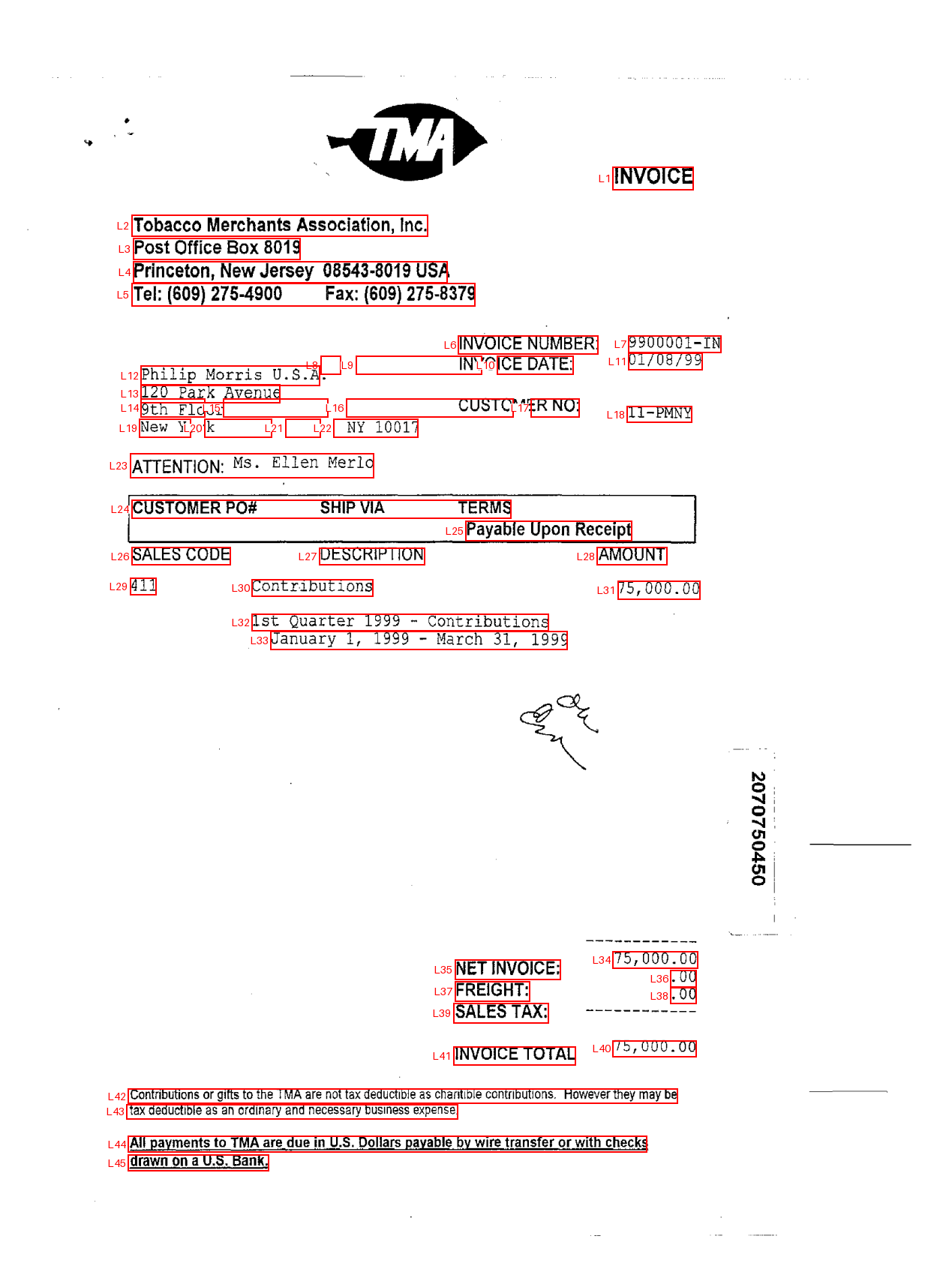
- **Each invoice field becomes a question**. We ask 12 such questions, plus one for the invoice's currency. Each question is of "Choice" type, where each line in the PDF is an option Strom can pick from. Also, every question has an option "none", in case the field is not present in the invoice at all. E.g. VAT ID might be missing from the PDF, and we should give Strom a way to represent such a case.
This is how the **response** looks:
```json
{
"model": "strom-1.0.7",
"answers": {
"supplier": {
"type": "choice",
"choice": "L2",
"confidence": 0.9677762475508005,
"probabilities": {
"L1": 0.004401314928251427,
"L2": 0.9785174983672003,
...
"L45": 9.183572895225142e-05,
"none": 0.0011083225443333591
}
},
"invoice_number": {
"type": "choice",
"choice": "L7",
...
}
},
"usage": ...
"metadata": ...
}
```
## Strengths of this approach
- **No hallucinations**: Strom picks the line which it thinks refers to the due date. Therefore it cannot make up values, which is a major blocker with plain old LLMs.
- **Speed**: Processing a typical invoice of 2 pages takes ~500ms for the entire process, excluding any network latency.
- **Cost**: A typical invoice costs about $0.00049. This means roughly 2000 invoices can be processed for $1.
- **Confidence scores**: Each field is accompanied with a confidence score. This means we can shortlist invoices which need further attention - manual checks or escalate to a more intelligent-but-expensive LLM.
## Weaknesses
- **Intelligence**: Strom is a decision model, therefore it does not reason like most frontier LLM models. Therefore it will make more mistakes in picking fields, especially in invoices which deviate too far from the standard format.
- **Cannot generate text**: Decision models by design cannot generate text. This means, for example, they cannot infer the due date based on the line "Due 30 days from now", while an LLM could.
## Wrapping up
Here is a visual representation of what comes back for the invoice from above:
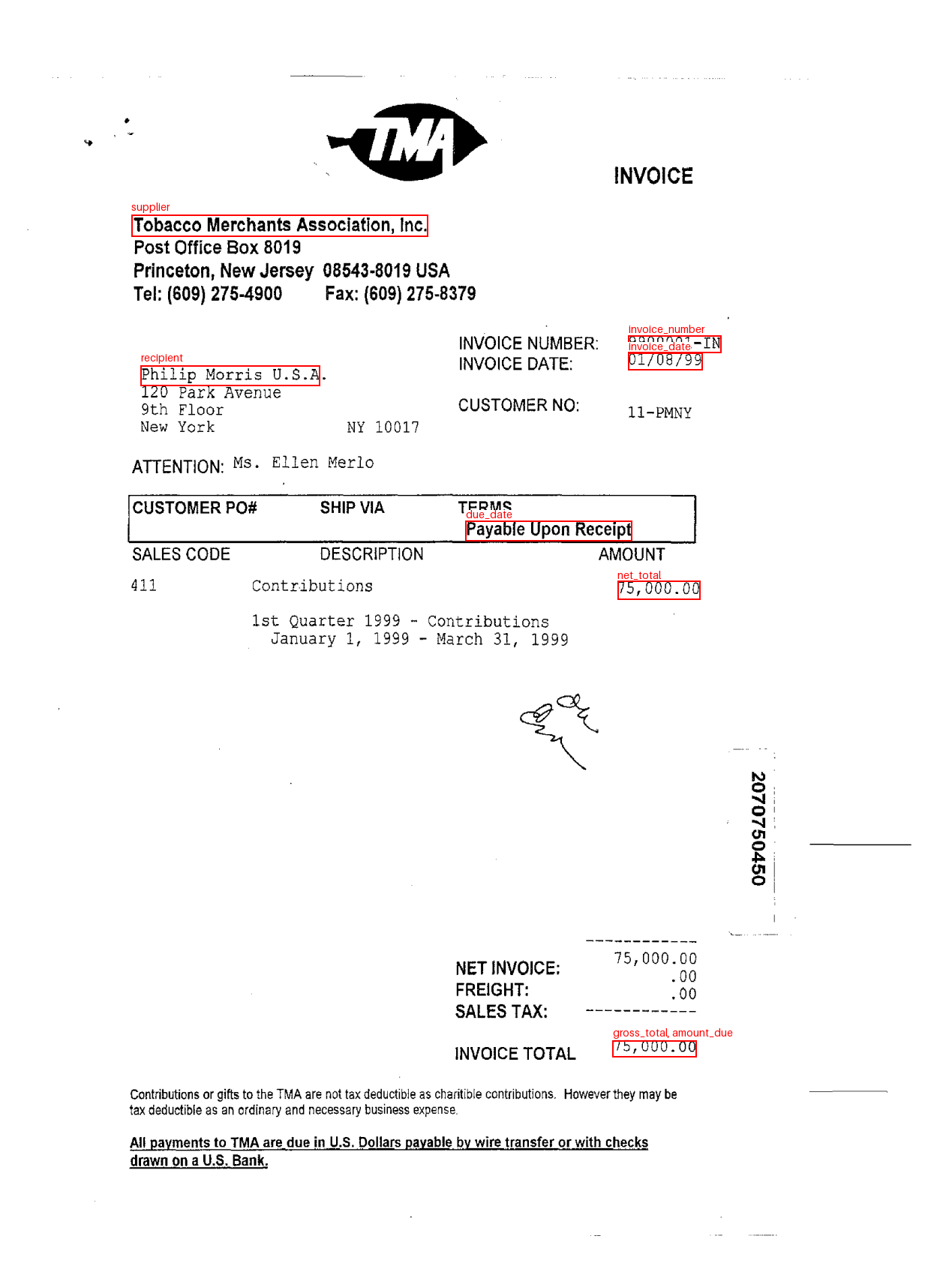
The trick here isn't specific to invoices. Strom can't write out a value, but it can pick one: split the document into candidates, number them, and ask which one holds the answer. The same works for
contracts (which clause sets the notice period?), receipts, forms or any other document with a fixed set of things to find. The model can extract the fields, and plain code can do the post-cleanup and validations.
You can try the invoice analyzer on your own PDFs here, or build your own pipeline with the API.